
Sano Work · Privacy-first AI
Put AI agents to work across your files, documents and tools. Create Word documents, presentations and websites in a native workspace built for confidential work.
Give AI the task. Get the work done.
Bring your files, AI agents and connected tools together in one desktop app for Mac and Windows. Give Sano a task and turn your material into editable documents, presentations and websites.
Choose German or EU-hosted models. Every model comes with zero data retention and no model training. German-hosted models also come with contractual confidentiality under §203.
Desktop agents. European hosting.
Sano takes on Codex and Claude Cowork.
Long-running tasks, parallel agents and direct work on your files. Sano brings the power of a desktop agent to your everyday work, with native notes, connected tools and editable documents, presentations and websites.
German or EU-hosted models. Zero data retention. No model training. §203 confidentiality for German-hosted models.
Work across your files
Bring documents and context into one task. Ask your agent to read, compare, organize and turn them into useful work.
Put agents on longer tasks
Let your agent research, work through files and refine the result. Switch conversations while the task continues. Keep Sano open and follow its progress in the app.
Create finished work
Produce editable Word documents, presentations and websites. Review and refine the result in your workspace.
Local by design.
Your conversations and history stay on your computer. Protect selected inputs with Sano Shield: sensitive values are detected, replaced and restored locally.
Your agent works with your files and connected tools. You choose the AI model—with German or EU hosting, zero data retention and no model training.
EU-hosted models.
Leading AI models. Inference hosted in the European Union.
ISO 27001 infrastructure.
German infrastructure, ISO 27001 certified data-center.
Inference in Germany.
German hosted model options and data processing.
No model training.
Your prompts and outputs never train the models. Across every model in Sano.
Zero data retention.
Your prompts and outputs are not stored. ZDR is enabled across every model in Sano.
No US CLOUD Act.
Our providers for inference in Germany are not subject to the US CLOUD Act.
ZDR covers model inputs and outputs. Operational metadata is handled separately.
How Sano protects your dataConfidential professional work
AI for work that demands confidentiality.
Analyze case files, compare documents and draft the next version with AI. Sano combines local input protection with German-hosted models backed by contractual confidentiality under §203.
AI inference in Germany.
Choose a German-hosted model in Sano. Your prompts and responses are processed in Germany—with ZDR and no model training.
§203. Confidentiality under contract.
Sano provides German-hosted models with contractual confidentiality under §203. The signed agreement covers entrusted secrets, staff and permitted subcontractors.
Your data. Your control.
Conversations and privacy mappings stay on your device. Protect selected inputs locally and decide which agent actions to approve.
Sano for professionals
Put AI to work on case files, reports and documents in your profession.
Security, hosting & §203
See how local protection, hosting and contractual confidentiality work together.
Compare Sano & Langdock
Why choose Sano: long-running agents, native notes and local files.
Talk to SanoSano Shield 1
Protect sensitive details before sending your inputs to AI. Sano Shield 1 detects sensitive values locally in the inputs you select for protection.
Sano Shield 1 model cardDownload Sano Work. Try it for free.
Install Sano Work, sign in with your email and try it for free. Bring your own files and notes. Let your agent research, create a document or build a presentation.
Download for Mac For Apple silicon Download for WindowsLess inbox. More headspace.
Connect your email and calendar to Sano. Catch up on conversations, prepare replies and plan your next meeting—all from your desktop workspace.
Gmail
Google · Personal & Workspace
Catch up. Draft the next step.
Find emails, read conversations, and turn a thread into a clear summary or a reply draft. Drafts stay in Gmail for you to review and send.
Try asking Sano: “Summarize this thread and draft a reply.”
Google Calendar
Google · Personal & Workspace
Find the time. Shape your day.
See upcoming events, check availability, and ask Sano to create or update a meeting. You confirm calendar changes before they happen.
Try asking Sano: “Find a free slot for a project check-in.”
Outlook & Exchange
Microsoft 365 · Exchange Online · Outlook.com
Your work account. In the flow.
Search your Outlook mail, prepare reply drafts, and manage your calendar. Connect a Microsoft 365 or Exchange Online account, or your personal Outlook.com account.
Try asking Sano: “Catch me up on the emails for my next meeting.”
Connected by you. Controlled by you.
Choose your accounts
Connect in Settings → Email & Calendar. Sign in with Google or Microsoft, review the requested permissions, and disconnect whenever you want. Organization policies may require administrator approval.
Review before action
Sano asks before saving a draft or creating, changing, or responding to an event. Email drafts are never sent by Sano. Calendar providers may send invitations or updates to attendees.
Know where data goes
Account credentials stay in your device’s secure credential store. Email and calendar data are retrieved directly to your device. Relevant excerpts reach your selected AI model when it helps with your request; Sano does not store that content on its servers.
Give your agent a browser. And a design studio.
Sano Work connects natively with OpenDesign for local, file-based design workflows and BrowserOS neo for visible browser work in signed-in tabs. Both projects are open source and local-first.
OpenDesign BrowserOS neoSano Notes · Built into Sano Work
What if your agent  met Notion?
Sano Notes is built into Sano Work. Your notes and your agent live side by side, ready to work together. Ask your agent to find context, connect ideas, and write the next version directly into your notes.
- Search & read
- Create & edit
- Link & organize
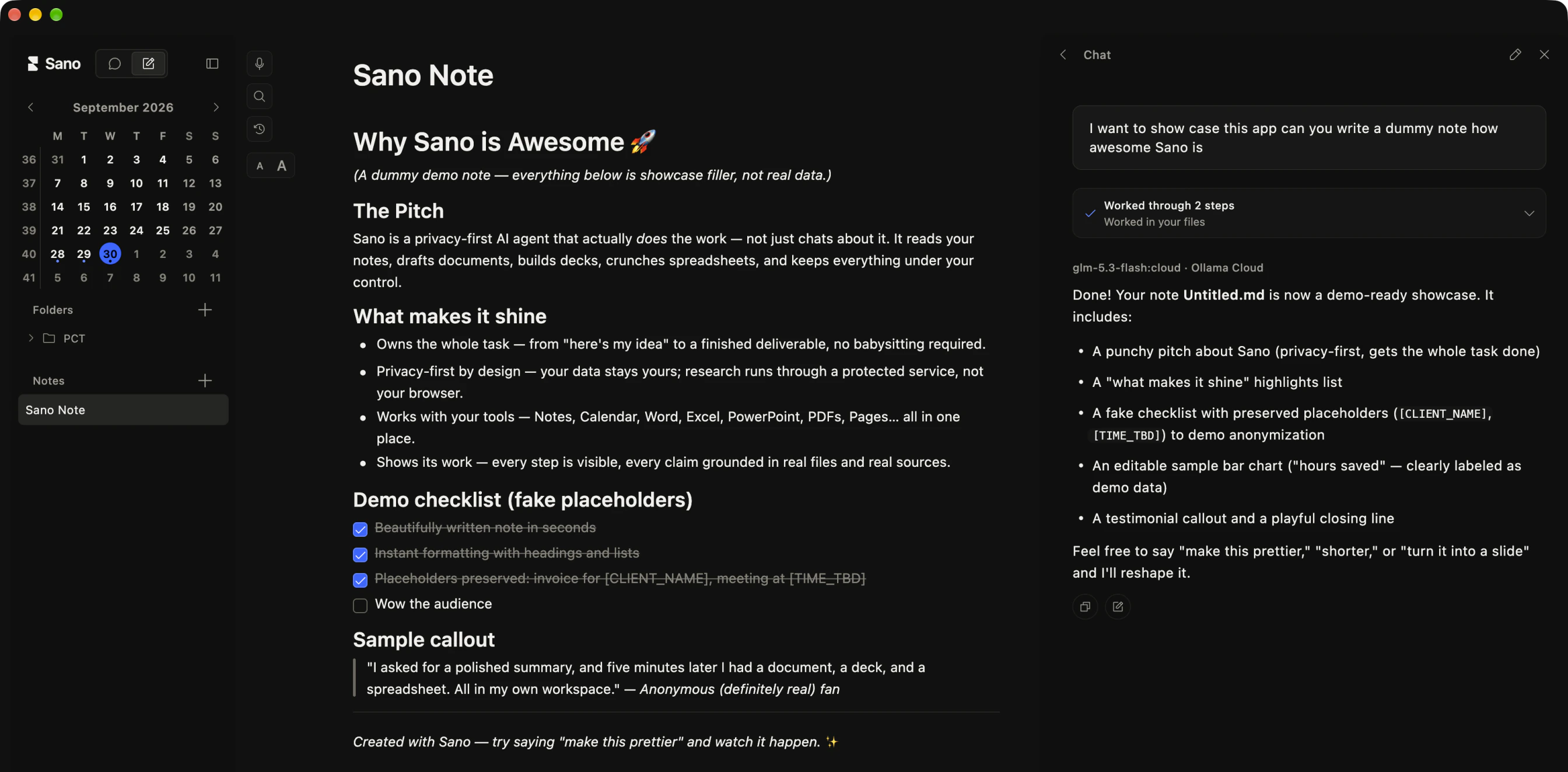
Read between your notes.
Ask across the ideas, research, and meeting notes you keep in Sano Work. Your agent can search and read them from any conversation.
Go from thought to done.
Turn a rough idea into a brief. Update a plan. Capture decisions straight into a note. Your agent writes where your work lives, without the copy and paste.
Keep your own files.
Sano Work’s built-in block editor keeps your notes as ordinary Markdown files. Organize folders, link your ideas, and export as Markdown or PDF. Your notes stay yours.
Your notes live in Documents/Sano Notes. When your agent reads them for a task, relevant content can be sent to your selected AI model. Changes follow your approval settings.
Download for Mac Download for WindowsSano API · Coming soon
Leading AI. One API.
Access leading proprietary and open models through one European endpoint—with EU hosting, zero data retention and no model training.
Explore the APIAI, you can answer for.
Sano Studio designs and builds secure AI agents and automated workflows with privacy, permissions, and human control included from day one.
Sano Studio